Liquid Glass turns the system's panels into glass. It covers the notification shade and Quick Settings tiles, notifications, the music player, the volume panel, the power menu, dialogs and the lock screen buttons. Since November it runs on Catalyxx's glass engine by Brian_OP13, with RR's own edge and controls on top.
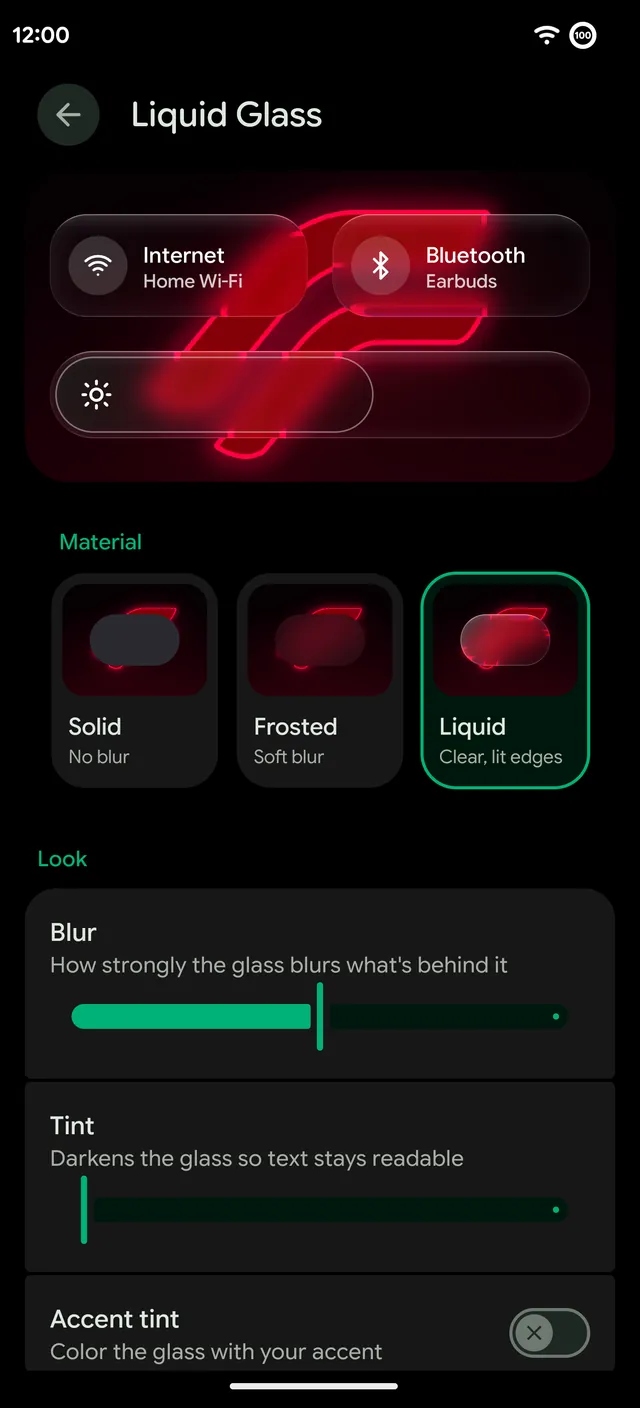
Three materials
- Solid. No blur at all, for the clearest text and the lightest load.
- Frosted. A soft blur, like classic Android blur.
- Liquid. Clear glass with lit edges that bends what's behind it.
Two sliders set how strongly the glass blurs and how much it's tinted, so text stays readable over any wallpaper. Accent tint colors the glass with your accent. Tint also works with Android's own glass color.
Glass that moves
- Light moves across the glass as you tilt the phone.
- Glass squishes under your finger, and a slider's knob turns into a lens while you drag it.
- The volume panel and power menu grow out of their keys. Heads-up notifications drip from the camera hole, and panels melt back where they came from.
- Two edge styles: RR's lens edge, the default, and Catalyxx's thin rim.
The Glass clock
Glass is also a lock screen clock face. The wallpaper bends through the numbers and their edges catch the light, and it stays readable over dark wallpapers. Pick it with the other clock faces.
Glass folders
RR Launcher's home screen folders can be glass too, from Catalyxx. They match the shade, so the whole phone feels like one material.
Light on the battery
Glass costs GPU time, so RR keeps it small. With the shade open, Liquid went from about 6 to 4 or 5 ms a frame. The tilt light reads the motion sensor in batches, stops redrawing the screen while the phone is still and turns off in Battery Saver. Blur reuses one buffer instead of making a new full-screen one every frame.
Where to find it
Remixer › Theme › Liquid Glass is one screen with a live preview on top and tabs for its options. Press Try melting to watch the panels melt and grow back.