Remixer is where Resurrected Remix keeps everything it adds to Android. Open Settings and it's the big card near the top. Inside, Remixer opens on your current look, shows the accent and font you're using, and lays the rest of the system out as cards: Status bar, Quick settings, Notifications, Theme, Lock screen, Navigation and Miscellaneous.
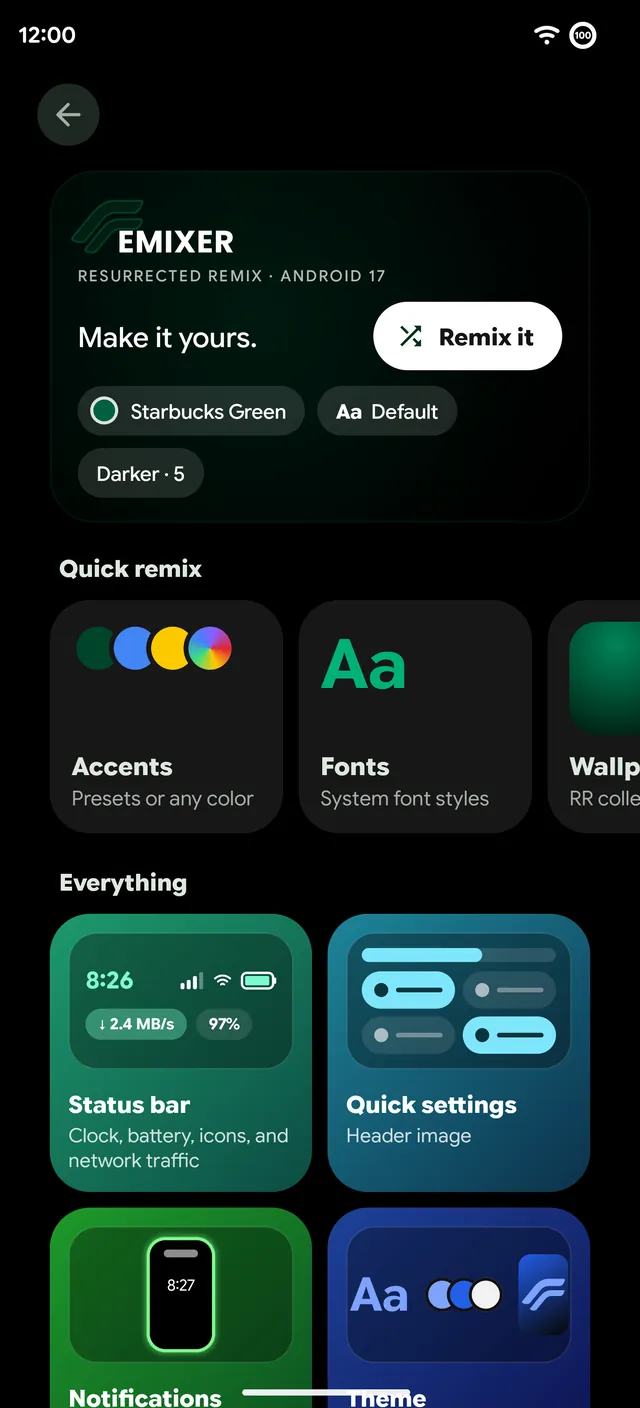
Remix it
The button at the top of Remixer rolls a random preset for the whole phone in one tap. It's the same idea as the original Resurrection Remix, where the point was never one fixed look but a phone you keep changing. Don't like the roll? Press it again. You can try it on the homepage too.
Looks and Modes
A Look is a saved set of choices: accent, Quick Settings style, clock face, font, wallpaper, haptic patterns and edge light colors. Save the one you have now and come back to it whenever you like.
- Remix Modes. Give each Android Mode its own Look. Turn on Sleep, Work or Driving and the phone changes with it, with a ripple of color across the screen.
- Look tile. A Quick Settings tile that cycles through your saved Looks.
- Look roulette. A different Look on every unlock, or once a day.
- Share yours. Send a Look to a friend as a QR code or a line of text.
Accents, fonts and boot animations
There are 49 accent colors to start from, from RR's own Resurrected red to presets named after the apps and brands they borrow from, or pick any color yourself. Two sliders shade the accent darker or lighter and change its saturation, and Quick Settings and the rest of the system follow along.
47 system fonts come built in, and you can import your own TTF or OTF font and use it everywhere. Ten boot animations round it off.
Where each option lives
- Status bar. Clock and date styles, battery style and the neon ring, signal and Wi-Fi icons, network traffic and weather. See Status bar and icons.
- Quick settings. The thirteen looks and the customizer, header images and the slider tiles. See Quick Settings.
- Notifications. Edge lighting, app icons and charging sounds. See Edge lighting.
- Theme. Accents, fonts, wallpapers and Liquid Glass.
- Lock screen. Clock faces, At a Glance, Nightstand, the fingerprint icon and animation, the media player style, the Now Bar, charging animations, pocket mode, charging info, screen-on time and weather. See Clock faces and the lock screen.
- Navigation. Pulse, pie controls, buttons, the navigation bar and three-finger swipe. See Pie, Pulse and gestures.
- Miscellaneous. Quick switch between launchers, the volume panel, backup, Haptic Remix, scroll haptics and the USB mode picker.
Back up your setup
Remix backup saves everything you've set in Remixer and restores it later, for example after a clean install. The Updater offers to back up your Remixer setup before it installs a new build, so an update never costs you your look.
Most pages show a live preview at the top, drawn by the system itself, so you see a change before you apply it. Where a change needs System UI to restart, Remixer asks first.